

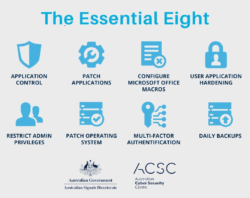
With cyber threats evolving at a rapid pace, securing cloud platforms like Microsoft 365 has never been more critical. Businesses across Melbourne depend on Microsoft 365 for email, collaboration, and data storage. Protecting these systems against phishing, ransomware, and unauthorised access is essential for safeguarding sensitive information.
Understanding the Risks
Microsoft 365 is a robust suite, but it’s not immune to threats. Cybercriminals often target email systems and shared workspaces, exploiting weak passwords or unpatched vulnerabilities. Without strong security measures, a breach can cause data loss, reputational damage, and non-compliance with Australian privacy laws.
Implementing Multi-Factor Authentication (MFA)
MFA is one of the most effective ways to secure Microsoft 365 accounts. It requires users to verify their identity with a second factor, such as a code from an authenticator app or a text message, making it far harder for attackers to gain access.
Leveraging Conditional Access Policies
Conditional access allows businesses to set rules based on location, device type, and user role. For example, you can block sign-ins from unusual locations or require MFA for high-risk access attempts.
Data Loss Prevention (DLP) Policies
DLP policies help prevent sensitive data such as tax file numbers or financial information from leaving your organisation. Microsoft 365 provides templates that align with Australian data protection requirements.
Email Security Enhancements
Defending against phishing is vital. Microsoft Defender for Office 365 scans incoming emails for malicious links and attachments, reducing the risk of successful attacks.
Regular Security Audits
Routine reviews of user permissions, sign-in logs, and security configurations ensure ongoing protection. Partnering with ITswitch’s Managed IT Services offers expert oversight and proactive adjustments.
Employee Training
Human error is one of the greatest risks. Training staff to recognise suspicious emails and avoid unsafe links is essential for boosting security.
Incident Response Planning
Even with strong defences, incidents can occur. A clear, tested incident response plan enables your business to contain and recover from breaches swiftly.
Integration with Azure Security
If your organisation also uses Microsoft Azure, integrating Microsoft 365 security with Azure Migration Services ensures a consistent, unified approach.
Conclusion
Securing Microsoft 365 demands a mix of technology, user education, and expert guidance. Melbourne businesses that adopt these measures will protect their data and build trust with clients and stakeholders.
Contact Us
Protect your Microsoft 365 environment with ITswitch . Contact us today to arrange a security review and get tailored recommendations.
For a deeper look into how technology fuels business success, check out our post on how IT solutions drive business growth and innovation .
Frequently Asked Questions
2. What is the most important security step for Microsoft 365?
Implementing multi-factor authentication across all accounts is the single most effective measure.
3. Do I need a third-party backup for Microsoft 365?
Yes, to ensure comprehensive protection beyond Microsoft’s retention policies.
4. Can Microsoft 365 help with compliance in Australia?
Yes, it includes tools to assist with Australian Privacy Principles and industry-specific regulations.
5. How can ITswitch help secure my Microsoft 365 environment?
We provide configuration, monitoring, training, and ongoing support tailored to your business needs.
Latest Blog

What Is the Essential Eight & Why Australian Businesses Can’t Ignore It in 2026

How Managed IT Services Melbourne Boost SMB Productivity

How Microsoft Teams Voice Integration Improves SMB Communication in Melbourne

Secure IT Asset Relocation: Best Practices for Businesses