

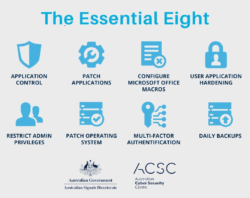
Application control cybersecurity is a critical component of modern defence strategies, helping organisations prevent unauthorised software from executing on their systems. As cyber threats grow more sophisticated, traditional antivirus tools alone are no longer sufficient. Businesses need structured, proactive approaches that limit what can run within their environments.
This blog explores what application control cybersecurity is, how it works, and why it plays a key role in endpoint protection strategies. It also compares allowlisting vs blocklisting, outlines practical implementation steps, and highlights commonly used application whitelisting tools.
What is Application Control Cybersecurity
Application control cybersecurity refers to a set of security practices and technologies that restrict which applications are allowed to run on a system. Instead of reacting to threats after they appear, application control proactively blocks unauthorised software from executing.
This approach ensures that only approved programs, scripts, and executables can operate within an environment. It is particularly useful in preventing unknown or zero-day threats, as anything not explicitly allowed is automatically denied.
Application control typically relies on policies defined by administrators, which determine what is permitted based on criteria such as file hash, publisher, or path.
Why Application Control Matters in Modern Security
The modern threat landscape includes ransomware, fileless malware, and sophisticated phishing attacks. These threats often bypass traditional security tools by exploiting trusted applications or running in memory.
Application control strengthens security by:
- Reducing the attack surface
- Preventing execution of malicious or unauthorised files
- Supporting compliance requirements
- Enhancing visibility over application usage
Organisations implementing strong endpoint protection strategies often rely on application control as a foundational layer.
How Application Control Works
Application control operates through predefined rules that determine whether software can run. These rules can be configured in several ways:
Rule-Based Execution
Administrators create rules allowing or blocking applications based on attributes such as:
- File path
- Digital signature
- File hash
- Publisher certificate
Policy Enforcement
Once rules are defined, they are enforced across endpoints. Any application that does not meet the criteria is automatically blocked or restricted.
Continuous Monitoring
Modern systems continuously monitor application behaviour and provide logs for auditing and compliance.
Allowlisting vs Blocklisting
One of the most important distinctions in application control is between allowlisting and blocklisting.
Key Differences
| Feature | Allowlisting | Blocklisting |
| Approach | Only approved apps allowed | Known malicious apps blocked |
| Security level | High | Moderate |
| Maintenance | Requires initial setup | Requires continuous updates |
| Protection against unknown threats | Strong | Weak |
| Common use case | High-security environments | General-purpose systems |
Allowlisting Explained
Allowlisting permits only trusted applications to run. Everything else is denied by default. This approach is highly effective for malware prevention techniques because it blocks unknown threats automatically.
Blocklisting Explained
Blocklisting allows all applications except those explicitly marked as malicious. While easier to implement, it relies heavily on updated threat intelligence and may miss new or unknown attacks.
Types of Application Control Methods
Application control can be implemented using different techniques depending on organisational needs.
Default Deny Model
Everything is blocked unless explicitly allowed. This is the most secure method.
Default Allow Model
Everything is allowed unless explicitly blocked. This is less secure but easier to manage.
Publisher-Based Control
Applications are allowed based on trusted software publishers.
Hash-Based Control
Each application is identified by a unique file hash, ensuring exact control over execution.
Path-Based Control
Applications are allowed based on their location in the file system.
Role in Endpoint Protection Strategies
Application control is a vital part of endpoint protection strategies. It complements other tools such as antivirus software, firewalls, and intrusion detection systems.
Integration with Other Security Layers
- Works alongside antivirus to block unknown threats
- Supports zero trust frameworks
- Enhances device control policies
- Strengthens identity-based access controls
Use Cases
- Preventing ransomware execution
- Restricting unauthorised software installations
- Securing remote work environments
- Protecting critical infrastructure systems
Application Whitelisting Tools Overview
A variety of application whitelisting tools are available to support application control implementation.
Common Features
- Centralised policy management
- Real-time monitoring
- Integration with existing security systems
- Reporting and analytics
Types of Tools
- Operating system native tools
- Third-party endpoint security platforms
- Cloud-based security solutions
When selecting tools, organisations should consider scalability, ease of management, and compatibility with existing infrastructure.
Malware Prevention Techniques Using Application Control
Application control plays a crucial role in malware prevention techniques by stopping threats before they can execute.
Key Techniques
Blocking Unknown Executables
Only approved software can run, preventing malware from launching.
Script Control
Restricts execution of scripts such as PowerShell or JavaScript, often used in attacks.
Application Sandboxing
Allows suspicious applications to run in a controlled environment.
Privilege Restriction
Limits application permissions to reduce damage potential.
Benefits and Limitations
Benefits
- Strong protection against zero-day attacks
- Reduced reliance on signature-based detection
- Improved compliance and audit readiness
- Better visibility into application usage
Limitations
- Initial setup can be complex
- Requires ongoing management
- May disrupt user productivity if not configured correctly
Implementation Best Practices
Implementing application control successfully requires careful planning.
Start with an Audit Mode
Monitor application usage before enforcing strict policies.
Define Clear Policies
Identify which applications are essential and create allowlists accordingly.
Use Layered Security
Combine application control with other endpoint protection strategies.
Regularly Update Policies
Adapt to changing business needs and emerging threats.
Train Staff
Ensure users understand why restrictions are in place.
Common Challenges and How to Overcome Them
User Resistance
Employees may find restrictions inconvenient. Clear communication helps reduce friction. Providing clear explanations about why application control is necessary can improve acceptance. Training sessions, onboarding materials, and ongoing support can help users understand the security risks associated with unauthorised applications. Involving employees in the rollout process and gathering feedback can also reduce resistance.
When users feel informed and supported, they are more likely to follow policies and adapt to changes without significant disruption to their daily workflows.
Policy Complexity
Large environments can be difficult to manage. Automation tools can simplify processes. As organisations scale, managing application control policies across multiple devices, departments, and user roles becomes increasingly complex. Using centralised management platforms and automation can streamline policy updates and enforcement. Standardising configurations and grouping users based on roles can also reduce administrative overhead.
Regular audits and clear documentation further help maintain consistency, ensuring that policies remain effective without becoming overly complicated or difficult to maintain over time.
Compatibility Issues
Some legacy applications may not work with strict policies. Testing is essential. Older or custom-built software may not meet modern security standards, leading to disruptions when application control is enforced. Conducting thorough testing in a controlled environment before full deployment can identify potential issues early.
Creating exceptions where necessary and working with vendors to update incompatible software can minimise disruption. Maintaining a balance between security and operational needs is key to ensuring business continuity while still benefiting from strong application control measures.
Future Trends in Application Control
Application control continues to evolve with advancements in cybersecurity. As threats become more sophisticated, organisations are adopting more adaptive and intelligent approaches to application management. Modern solutions are increasingly integrated with broader security ecosystems, enabling better coordination between tools and improved threat visibility.
The focus is shifting towards proactive defence mechanisms that can anticipate risks and respond in real time, helping organisations stay ahead of emerging attack techniques.
AI and Machine Learning
Improves detection of unusual behaviour and automates policy creation. Artificial intelligence and machine learning are playing a growing role in application control by analysing patterns and identifying anomalies that may indicate malicious activity. These technologies can reduce manual effort by automatically generating and adjusting policies based on observed behaviour.
Over time, systems become more accurate, helping to minimise false positives while improving overall security effectiveness. This allows organisations to respond more quickly to threats without relying solely on manual intervention.
Zero Trust Integration
Application control aligns closely with zero trust principles. In a zero trust model, no application or user is automatically trusted, even if they are inside the network. Application control supports this approach by enforcing strict verification before allowing any software to run. This reduces the risk of lateral movement within a network and limits the potential impact of a breach.
As more organisations adopt zero trust frameworks, application control will continue to play a central role in enforcing security policies at every level.
Cloud-Based Management
Provides scalability and easier deployment across distributed environments. With the rise of remote work and cloud computing, organisations require flexible solutions that can manage application control across various locations. Cloud-based platforms allow administrators to deploy and update policies remotely, ensuring consistent protection regardless of where users are located.
These solutions also offer real-time monitoring and analytics, enabling faster responses to potential threats. As businesses continue to embrace digital transformation, cloud-based management will become increasingly important for maintaining effective application control.
Conclusion
Application control cybersecurity is an essential strategy for preventing unauthorised software attacks. By focusing on allowlisting vs blocklisting, organisations can significantly reduce their exposure to threats and strengthen their endpoint protection strategies.
When implemented correctly, application control not only improves security but also enhances operational visibility and compliance. As cyber threats continue to evolve, adopting robust malware prevention techniques and leveraging application whitelisting tools will remain critical.
For organisations looking to improve their cybersecurity posture, structured application control strategies can provide a strong foundation. To learn more about implementing these solutions, contact us .
Frequently asked question
How does allowlisting improve security?
Allowlisting improves security by ensuring that only trusted applications can execute, preventing unknown or malicious software from running.
What is the difference between allowlisting and blocklisting?
Allowlisting permits only approved applications, while blocklisting blocks known malicious ones. Allowlisting offers stronger protection against unknown threats.
Are application whitelisting tools difficult to manage?
They can be complex initially, but modern tools offer automation and centralised management to simplify the process.
Can application control stop ransomware?
Yes, application control can prevent ransomware by blocking unauthorised executables before they run.
Is application control suitable for small businesses?
Yes, it can be scaled to suit businesses of all sizes and is particularly useful for protecting endpoints in smaller environments.
Latest Blog

What Is the Essential Eight & Why Australian Businesses Can’t Ignore It in 2026

How Managed IT Services Melbourne Boost SMB Productivity

How Microsoft Teams Voice Integration Improves SMB Communication in Melbourne

Secure IT Asset Relocation: Best Practices for Businesses